A Hard Drive Doesn't Fail Quietly: CCTV Recorder Health Checks for UK Homes and Shops
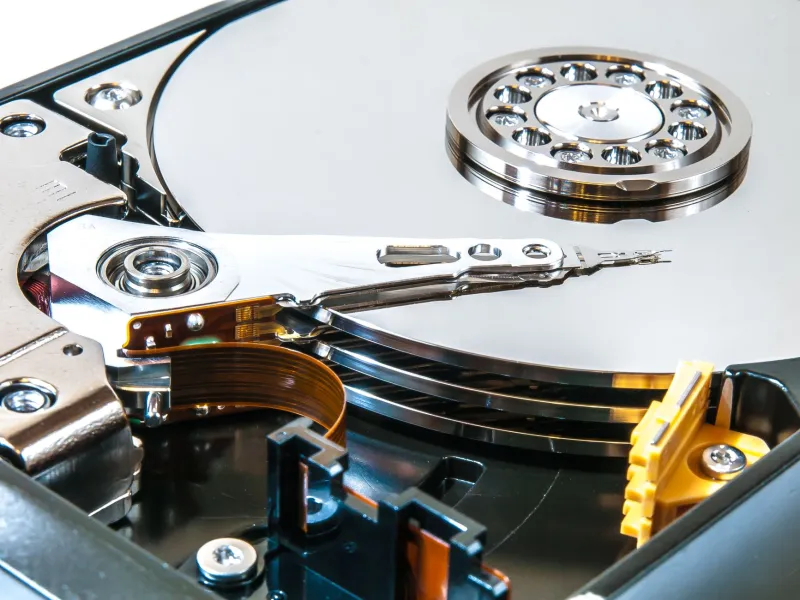
Most CCTV recorders spend their lives in a cupboard, under a counter or on a shelf in the back office. They whirr away quietly, and for months or years nobody thinks about them. Then one day the playback screen has a gap, the live view stutters, or the box starts making a noise you cannot quite place. That noise is often the hard drive telling you something.
A recorder is a small computer with a big, spinning storage device inside it. The cameras get the attention, but the drive is what turns a camera system into evidence. If it fails, you do not just lose the ability to watch live. You lose the past. So it is worth knowing what the drive is doing, what its noises mean, and how to replace it before it becomes a problem.
First, what is actually inside the box
An NVR or DVR is a recorder with a hard drive inside. Most use a standard 3.5-inch SATA drive, much like a desktop PC, but the good ones use a surveillance-grade drive. That distinction matters. Surveillance drives are built to run continuously, cope with heat and vibration, and handle the constant writing that CCTV demands. A desktop drive is designed for bursts of use and long idle periods. Put one in a recorder and you are asking it to do a job it was not really designed for.
You may also find a smaller solid-state drive in some modern recorders, but spinning hard drives remain common because they are cheap per terabyte. The trade-off is that they have moving parts, and moving parts wear out.
The noises, and what they tend to mean
A healthy recorder is not silent. You will usually hear a low whirr, the occasional tick as data is written, and maybe a soft fan hum. That is normal. What you are listening for is a change from normal.
A rhythmic clicking is the classic warning. It often points to the drive head struggling to read or write. It is not a guarantee of imminent death, but it is not a sound to ignore either. Repeated beeping from the recorder is usually an alarm, not the drive itself. It can mean the drive has dropped out, the disk is full, or the recorder has lost a camera. Grinding or scratching is worse news. If you hear that, stop relying on the drive and get your important clips off it if you still can.
Missing footage is the other big clue. Gaps in the timeline, failed playback, a recorder that reboots when you try to search, or a message about a hard disk error all point the same way. Sometimes the drive is fine and the problem is a loose SATA cable or a power issue. But you should rule the drive out first, because that is where the valuable data lives.
Why CCTV drives die younger than you expect
A drive in a busy shop or a home with six cameras is writing almost all the time. Continuous recording means constant wear. Motion recording reduces the amount of footage written, but it still writes in bursts and maintains an index, and the drive is still powered up around the clock. More cameras, higher resolution and higher bitrates all add to the workload.
Heat is the quiet killer. A cupboard with no airflow, a loft that bakes in summer, or a stack of network kit beside the recorder all shorten a drive's life. Vibration matters too. A drive sitting on a wobbly shelf or next to a door that slams is not in a happy place.
This is why a drive that lasted five years in a home office might last two or three years in a recorder. It is not bad luck. It is workload.
The SMART check nobody runs
Most hard drives support SMART, which stands for Self-Monitoring, Analysis and Reporting Technology. It is a set of health readings the drive keeps about itself. Your recorder may show some of these in its menu under storage, HDD information or disk health. If it does not, you can often check by removing the drive and connecting it to a PC with a USB adapter, though that is a job for someone comfortable doing it.
The readings worth looking at include reallocated sectors, pending sectors, uncorrectable sectors and CRC errors. A small number of reallocated sectors is not automatically a disaster, but a rising count is a warning. Pending and uncorrectable sectors are more serious. CRC errors often point to a cable problem rather than the drive itself. Temperature and power-on hours are useful context, not a countdown clock.
SMART is not a guarantee. A drive can pass a SMART check and still fail tomorrow. But it is a useful early warning, and it takes five minutes. If your recorder can email alerts or show a warning on screen, turn those on. A message now is better than a missing week of footage later.
A desktop drive is a false economy
It is tempting to replace a failed drive with whatever spare desktop drive is lying around. Resist that. A cheap desktop drive may work for a while, but it is not built for the same duty cycle. You are saving perhaps twenty or thirty pounds against a surveillance drive, and risking the recordings you actually need.
When replacing, match the interface and size. Most recorders take a 3.5-inch SATA drive. Check the recorder's supported capacity before buying, because older models can have limits. A surveillance-grade drive from a known brand is the sensible choice. If the recorder is still under warranty, check whether opening it affects that warranty before you start.
A simple UK-friendly replacement and backup routine
Once a month, look at the recorder. Check the timeline for gaps, listen for new noises, and look at the storage menu for warnings. Once a quarter, export a clip you would genuinely want if something happened, and check that it plays on a normal computer. Once a year, note the drive's power-on hours and SMART warnings if you can see them.
If the drive is failing, export the clips you need first. Then power the recorder down properly, unplug it, and replace the drive. Use an anti-static bag or touch a grounded metal surface before handling the new drive. Fit it, power up, initialise and format it in the recorder menu, then test a recording and a playback before you put the lid back on. Keep the old drive labelled and stored safely until you are sure you do not need anything from it, especially if the footage relates to an incident or an insurance claim.
A recorder is not a fireproof safe. It is a working machine with a consumable part inside. Treat the hard drive like tyres on a car: not something to think about every day, but something to check before it lets you down.