The Hidden Wattage: Why Your CCTV Cameras Clock Off When the Sun Does
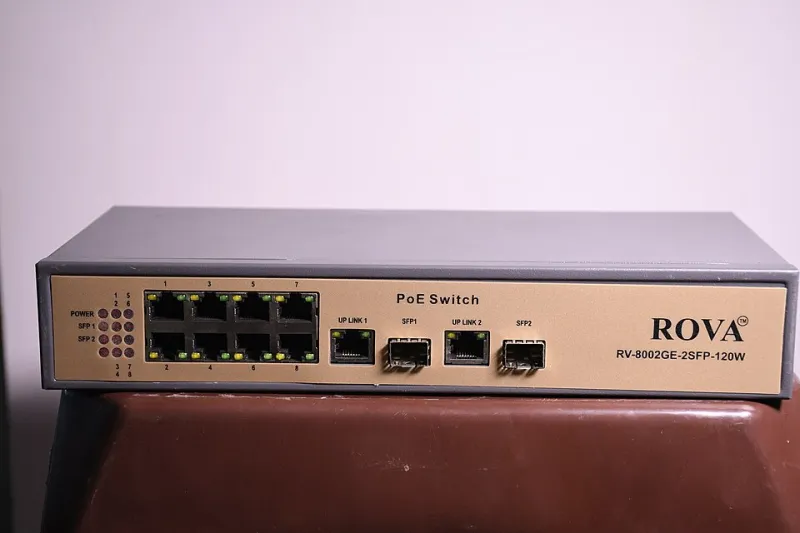
Photo: Bkvrova, CC BY-SA 4.0, via Wikimedia Commons
There's a particular kind of frustration that arrives in mid-November, somewhere around half four in the afternoon. The streetlights come on, the kettle goes on, and one of your cameras goes off. Not permanently. Just enough to be annoying. It blinks, reconnects, disappears for a minute or two, then reappears looking slightly guilty. By morning it's fine again. It will be fine all day tomorrow, too — right up until the light starts to go.
People assume the camera is faulty. They assume the cold got to it, or the rain found a way in, or the firmware is having one of its moods. Occasionally they're right. But more often than not, the thing that changed at dusk wasn't the weather. It was the wattage.
What PoE actually promises you
Power over Ethernet is one of those technologies that quietly does something impressive and then gets taken for granted. The idea is simple: the same cable that carries the video carries the electricity, so you don't need a mains socket up a ladder or a separate power supply screwed to a soffit.
There are two standards worth knowing. 802.3af promises 15.4W at the switch end and guarantees 12.95W at the camera, because some of it is lost in the cable. 802.3at — often called PoE+ — promises 30W and guarantees 25.5W. Then there's "passive PoE", which is a polite way of saying "we've shoved 24 volts down the wire and hope you've read the label". There's no negotiation, no handshake, no protection. It works until it doesn't.
That 12.95W figure is the one to remember. It's a ceiling, not a target, and it's closer than a lot of people realise.
The night shift nobody budgets for
Here's the bit that catches people out. A modern bullet camera can idle along quite happily at 3 or 4 watts during daylight. The sensor is doing its thing, the processor is compressing video, the network chip is chatting away — and that's roughly it.
Then the light drops below a threshold and the camera switches over. The IR-cut filter clicks out of the way, the infrared LEDs fire up, and suddenly you've added anything from three to eight watts of load depending on how many emitters the thing has and how far the manufacturer is trying to throw light. A modest 4W daytime camera can easily be pulling 13 or 14 watts after dark.
Sit that on an 802.3af port and you're over the line. Not always far enough over to fail outright — that would be too kind — but far enough for the port to decide it's unhappy, cut power, wait a moment, and try again. Hence the flicker. Hence the reboot at dusk. Hence the camera that appears in the app at 3pm and is a grey rectangle by 5pm.
The NVR's total, not the port's maximum
The second half of the trap is the recorder. Almost every NVR sold for home and small-business use has a PoE budget printed somewhere on the box, and it is almost always less than the sum of what the individual ports say they can deliver.
A four-channel unit might offer, say, 48W in total across all four ports. An eight-channel model might share 120W — or, on some budget units, only 60W. Those numbers are the real limit. Four cameras at 14W each is 56W, and that's before anyone's thought about anything else. If your recorder has a 48W budget and you've got four cameras that each creep up at night, you've built a system that runs beautifully in June and falls apart in December.
This is why a camera can work perfectly for two years and then start misbehaving the moment you add a fifth. Nothing failed. You just crossed a line that was there all along.
Cable is a length tax you pay in volts
Copper isn't a perfect conductor. Over thirty or forty metres of Cat5e, some of the voltage pushed out by the switch never arrives at the camera, and the longer and thinner the run, the worse it gets. That's exactly why the standards guarantee less at the far end than they promise at the near end.
A few practical things worth knowing. Solid-core copper cable is what you want for permanent runs. Copper-clad aluminium — CCA, usually sold cheaply online and cheerfully described as "copper" — has noticeably higher resistance and is a poor choice for PoE over distance, particularly at the far end of a long run. Coiled-up pre-made patch leads, daisy-chained through a couple of couplers, are another classic. And a connector that's been sitting in a downpipe full of rainwater since last winter will add its own small, damp contribution to the problem.
None of this matters much in daylight. All of it matters at dusk, when the camera is asking for its maximum and the cable is at its least generous.
The symptoms, so you recognise them
- A camera that reboots or drops out reliably within an hour of sunset, then behaves all day
- Ports in the NVR log showing "PoE overload", "power off" or repeated link-down events
- IR flicker: the image pulsing brighter and darker as the illuminator struggles
- The camera appearing in the app but with no night vision at all
- Problems that get worse in cold snaps or after heavy rain on exposed connectors
- Two cameras that work fine, and a third that never quite does — usually the furthest one
A checklist for anyone adding one more camera
Before you buy, do this on paper. It takes ten minutes and saves a fortnight of swearing.
- Find the real maximum draw, not the typical figure. It'll be on the datasheet or the spec sticker, usually as "max power consumption" including IR.
- Add up every camera on the recorder. Include the ones that have been fine for years — they're still drawing.
- Compare the total with the NVR's shared PoE budget, not the per-port figure. Leave 20–30% headroom. Power supplies age, and the middle of January is not the time to discover that.
- Check the standard. If a camera needs 802.3at, the port must actually supply 802.3at. A passive injector is not the same thing.
- Measure your longest run rather than guessing it. Anything past about 60–70 metres deserves a second look, and past 100 metres you should be rethinking the design entirely.
- Check the cable spec. Pure copper, solid core, correctly terminated.
- If the budget's tight, use a separate PoE switch with its own power supply, or a mid-span injector for the greedy camera. You don't have to replace the recorder.
- Test at night. Genuinely. Not at 2pm with the curtains open — go out at half five, in the dark, and watch what happens.
The bit people forget
A CCTV system is an electrical system before it's a video system, and every electrical system has a budget. Cameras don't fail dramatically when you exceed it. They limp. They flicker and reconnect and produce exactly the kind of intermittent fault that makes you doubt your own eyes.
So when the evenings draw in and one camera starts acting up, resist the urge to blame the hardware. Get the wattages out, add them up, and compare the total to the number nobody read on the side of the box. Nine times out of ten, the maths explains everything — and the fix costs considerably less than a new camera.